Today, we aim to explore the topic of EXR in depth, discussing its significance, technical power, and the capabilities it offers in the fields of visual effects, animation, and cinema. Understanding the importance of using this format is essential: after the introduction and adoption of EXR, image quality and detail in the film and animation industry improved dramatically.
In complex cinematic and animated projects, the final image is often composed of multiple layers. EXR facilitates this process by allowing the storage of multiple channels and enabling layer-by-layer rendering. This gives directors and VFX and animation professionals the ability to adjust each part of the image separately, achieving the highest quality. The format provides greater dynamic range, higher accuracy in lighting and shadows, and precise control over images during post-production. As a result, films and animations can display more intricate details, and visual effects and lighting appear more natural. These improvements ultimately lead to higher final image quality and a significantly enhanced visual experience for viewers.
The EXR format, or OpenEXR short for Extended Dynamic Range is an image file format developed by ILM (Industrial Light & Magic) in 2003 for storing high-quality graphics data in the film and visual effects industry. Originally designed as a deep raster format for high-end VFX and animation production, it was quickly adopted across computer graphics, particularly in film and television. The goal of EXR was to provide a high-precision image format capable of storing a wide range of image data, including color, depth, and lighting information, all within a single file.
Since its initial release, OpenEXR has been continuously improved and expanded by ILM and other industry contributors. Being open-source, it has allowed other developers and companies to participate in its enhancement. Today, this format is widely used by organizations and projects in computer graphics, visual effects, animation, and even virtual reality. Besides ILM, various companies and teams, including the Academy Software Foundation (ASF) a non-profit organization dedicated to advancing film and television software have contributed to the development and maintenance of the format. While OpenEXR was originally created by ILM, it has evolved over the years through contributions from multiple parties to enhance its performance and capabilities.

EXR specifically stands for Extended Dynamic Range, highlighting the format's ability to store information across a wide dynamic range. The term “Open” in OpenEXR indicates that the format is open-source, meaning its source code is freely available to the public. Anyone can view, modify, and use it. This openness makes OpenEXR a widely adopted standard in the graphics and imaging industry, easily supported across different software and by various developers, without licensing fees or intellectual property restrictions.
Deep Raster:
The term Deep Raster refers to multi-layered or “deep” raster images that, in addition to standard pixel information (like color and brightness), store extra data such as depth, opacity, and 3D information. These additional data allow more advanced compositing and processing in graphics and VFX software. In contrast, standard image formats like JPEG or PNG store only color and brightness per pixel. Deep raster formats, however, also retain pixel depth (distance from the camera) and other visual attributes, which are crucial for complex image manipulation.
Key Features of EXR for Animation and Visual Effects:
As mentioned, EXR (OpenEXR) is a high-quality image format designed for high dynamic range imaging. Its key features that make it indispensable for animation and VFX include:
-
High Dynamic Range (HDR): EXR can store a wide range of colors and brightness values, capturing details from shadows to highlights. This makes it ideal for scenes with complex lighting, such as in VFX and animation.
-
High Bit Depth: EXR supports higher bit depths than standard formats like JPEG or PNG (e.g., 16-bit or 32-bit per channel), allowing for precise color accuracy and minimizing color artifacts during editing and rendering.
-
Multi-channel Support: EXR can store multiple channels within a single file, including depth, diffuse, specular, smoothness, and more. This feature allows VFX teams to access different image data separately throughout the production pipeline.
-
Lossless Compression: EXR supports lossless compression, meaning images can be stored uncompressed or in a non-destructive compressed format. This ensures that image quality is fully preserved even through extensive editing, rendering, and post-processing a critical requirement for high-end film and animation projects.

Support for 32-bit Floating Point Precision:
One of the most important features of EXR is its support for 32-bit floating point precision. This allows data to be stored with extremely high accuracy, which is crucial for tasks that require maintaining precision in final processing, such as compositing and rendering complex visual effects.
Support for Advanced Rendering Features:
In VFX and animation, images often need to include advanced features such as ambient occlusion, complex lighting simulations, or precise physical simulations. EXR fully supports these features, enabling artists to maintain final image quality without loss.
Flexibility in Post-Processing and Editing:
Due to its high precision, EXR is highly suitable for post-processing and editing in software like Nuke, Houdini, and Maya. Artists can adjust or correct image details easily without compromising quality.
Comparing EXR with Other Image Formats:
EXR is one of the best choices for animation and VFX projects, especially when high image quality, color and lighting accuracy, and flexibility in storing multiple types of information in a single file are required.
However, other formats may be more suitable for specific cases, especially where high compression or simplicity is needed. For example:
-
TIFF and PNG are commonly used for simpler 2D images with smaller file sizes.
-
EXR excels in complex projects, 3D graphics, and VFX workflows.
High Dynamic Range (HDR) and Its Use in Animation and VFX:
High Dynamic Range (HDR) refers to the difference between the brightest and darkest parts of an image or scene. This feature is especially important in digital imaging, animation, and visual effects, as it allows more details to be captured in both highlights and shadows.
Concept of Dynamic Range:
-
In Low Dynamic Range (LDR) images, the difference between the brightest areas (e.g., sunlight) and darkest areas (e.g., shadows) is limited, which may cause details to be lost or appear too dark or too bright.
-
In HDR images, a wider range of brightness is captured, allowing both bright and dark areas to retain details.
For example, in an HDR scene, you can see details in a bright sky as well as in deep shadows simultaneously. Formats like EXR that support HDR can store much more information from dark and bright areas without losing data, providing a richer and more realistic final image.
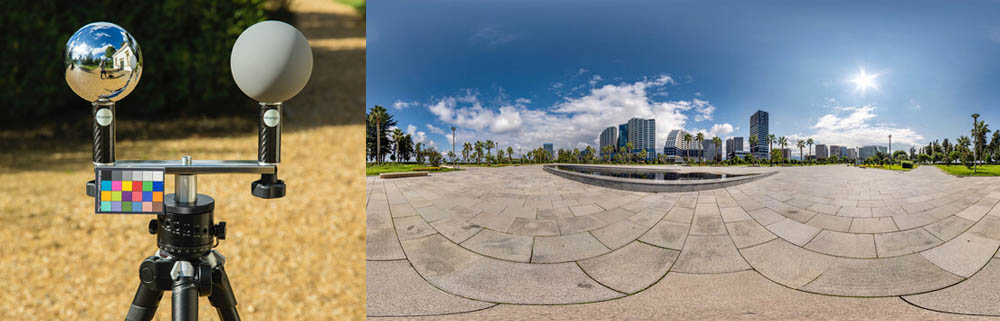
Application of HDR in Animation and Visual Effects
More Natural Lighting:
HDR allows animation and VFX artists to create more natural and realistic lighting. This is especially useful for simulating natural light sources such as sunlight or artificial lights that interact with different objects in a scene.
High Accuracy in Processing:
Working with HDR images provides higher precision in post-processing, including compositing, color correction, and rendering. As a result, HDR images can display a wider range of light information, capturing finer details from bright and dark areas in scenes, which is particularly important in computer graphics, animation, and VFX.
Relationship Between HDR and EXR
EXR is a file format specifically designed to store HDR images. In other words, EXR can store high dynamic range data effectively.
-
All HDR images can be saved as EXR, but not all EXR files are HDR.
-
EXR can also store images with normal (SDR) dynamic range.
-
The main advantage of EXR is its ability to handle HDR images with a wide dynamic range.
EXR Features That Make It Suitable for HDR Images
-
High Dynamic Range (HDR): EXR supports a very wide dynamic range, allowing it to store brightness values higher than what traditional SDR images can display. This makes it ideal for HDR workflows.
-
High Color Depth: EXR supports 16-bit or 32-bit per channel, enabling more precise storage of color and brightness details.
-
Additional Channels: EXR can store multiple channels such as depth, normals, specular, and more alongside HDR data, which is essential for professional graphics and VFX workflows.
Metadata in EXR and Its Importance
Metadata in EXR refers to additional data embedded in the image that describes various aspects of the file. This can include technical details, rendering settings, timestamps, and other attributes useful for processing, management, or analysis.
-
Metadata is typically generated and stored by the software or rendering system that produces the EXR file.
-
It can contain critical information needed during rendering, post-production, or compositing.
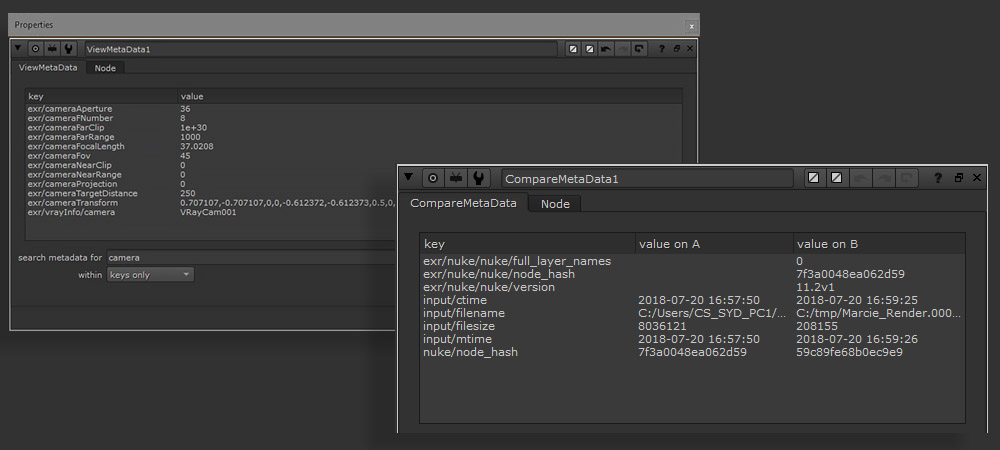
Types of Metadata in EXR include:
Technical and Rendering Metadata in EXR
Rendering Information:
-
Render Time: The time spent rendering the image or its specific layers.
-
Software or Render Engine: The name of the software or render engine used to produce the image (e.g., Maya, Houdini, Arnold, Redshift).
-
Render Settings: Details about various render settings, such as quality, resolution, sample counts, and other parameters.
Color Information and Color Space:
-
Color Space: EXR can store metadata indicating the color space of the image (e.g., Linear RGB, ACES AP1).
-
Gamma or Lighting Settings: Metadata may include gamma or lighting settings to ensure proper application during post-processing or compositing.
Geometric and Camera Information:
-
Camera Position: In VFX or animation projects, EXR can store camera position and viewing angle data, which is useful for accurate image matching during compositing.
-
Camera Matrices: Metadata may include camera matrices to precisely reconstruct camera position and orientation.
-
Depth and Distance Information:
-
Z-Depth: One of the most common types of metadata in 3D projects, representing the distance of each pixel from the camera, useful for depth-of-field effects and compositing.
-
Depth Layers: EXR can store multiple depth layers used for applying visual effects (VFX).
-
Layer and Channel Information:
-
Color Channels: An EXR image can include multiple color channels, such as RGB and Alpha, and may also include additional channels like Specular, Diffuse, Emission, Reflection, etc.
-
Layers: EXR images may include multiple layers (e.g., AOVs or Arbitrary Output Variables), allowing artists to edit different components of the image independently.
Compression Information:
-
Compression Method: Metadata can indicate the type of compression applied to the image, such as lossless or lossy, and the specific algorithm used (e.g., ZIP, PIZ, B44).
Noise and Correction Information:
-
Filters and Adjustments: Metadata can include details about post-processing corrections applied during rendering or compositing, such as blur filters, color correction, or other adjustments.
Timing and Project Information:
-
Creation Time: The date and time the image was produced.
-
Project Name: The name of the project or production in which the image was created.
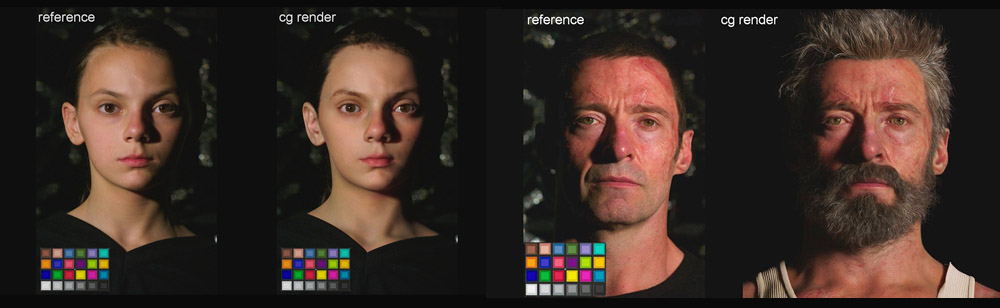
Importance and Applications of Metadata in EXR
Preserving Accuracy and Integrity in Production and Post-Production:
Metadata helps store precise information about rendering and images, which is highly valuable in later stages of production, such as compositing and editing.
Reducing Human Error:
By embedding metadata in an EXR file, all rendering parameters, camera settings, and other relevant configurations are automatically stored with the image, eliminating the need for manual input.
Flexibility in Image Editing and Processing:
Metadata allows complex edits, such as color grading or camera angle adjustments, to be applied without compromising the original data or image quality.
Support for Complex Projects:
In intricate VFX projects with multiple layers and elements, metadata can store information about each component, making it easier to utilize during compositing or other post-production processes.
Summary:
In EXR, metadata refers to additional information embedded in the image, typically including technical details, color data, rendering settings, camera information, and other image-related features. This data allows artists and technicians to track exactly how an image was created, improving accuracy, quality, and efficiency in complex VFX workflows.
Limitations of EXR Usage
-
File Size: Although EXR supports lossless compression, high color depth and multiple channels can result in very large files. In projects with many images, this can be challenging.
-
Complexity: Efficient use of EXR requires familiarity with concepts such as channels, layers, and compression settings, which can be complex for some users.
-
Limitations in Quick Editing: For projects that require rapid, real-time editing (e.g., documentaries or short films), simpler formats like PNG or TIFF may be more practical.
EXR in Cinematography and Photography
While EXR (OpenEXR) exists in the context of cinematography and photography, its primary use is in computer graphics and post-production rather than regular photography. Applications include:
-
Cinema and Professional Filmmaking: High-end cameras like RED, ARRI, or Sony Venice can capture video with high quality and wide dynamic range. In some systems, images are captured in HDR and later converted to EXR for post-production, enabling more precise color and lighting control.
-
Graphics and Visual Effects (VFX): OpenEXR is widely used in VFX and animation to store high dynamic range (HDR) images, preserving highly accurate color data and detailed lighting information for each scene.
-
HDR Photography: Professional photographers sometimes use cameras capable of HDR capture and then employ software like Photoshop or Lightroom to process and create images with extended dynamic range.
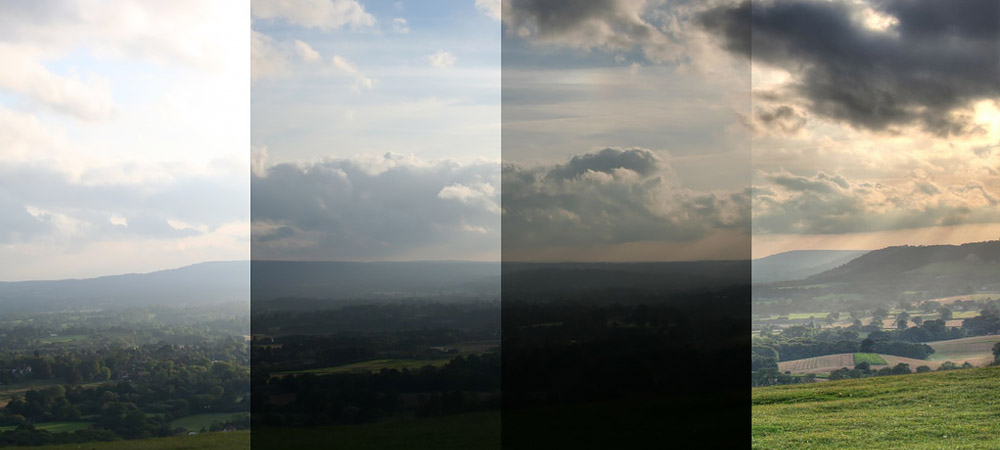
HDR Images and Conversion to OpenEXR
HDR images are often converted to formats like OpenEXR, as this format can store significantly more information compared to standard formats such as JPEG or TIFF. Typically, cameras and camcorders capture images in common formats like JPEG, TIFF, PNG, or RAW.
However, EXR (OpenEXR) is a specialized image format specifically designed for storing High Dynamic Range (HDR) images. It is primarily used in the film and post-production industry for processing high-quality images and videos. Most standard cameras do not natively support EXR.
In certain cases, professional cinematography cameras or cameras intended for post-production workflows can capture images in EXR, especially in the cinema and computer graphics industry. To use EXR for photos or video, one typically requires cameras capable of recording high color precision and wide dynamic range, such as RED or ARRI cameras, or post-processing software to convert captured images into EXR.
EXR Storage in Cameras
As mentioned, standard cameras usually store images in formats like JPEG, PNG, TIFF, or RAW. Some professional cameras, designed for HDR photography or filming in specialized lighting conditions, can generate images in HDR formats such as EXR.
These cameras often require specialized software or image-processing tools to produce EXR outputs. In practice, most cameras do not natively support EXR and store images in RAW or other standard formats. Later, these RAW images can be converted to EXR using software such as Adobe Photoshop, Nuke, or Blender.
Cameras Capable of HDR/EXR Storage
Cameras that can save images in EXR are typically high-end professional cameras used in cinema and film production, designed for capturing images with a wide dynamic range (HDR). This format is mainly used in Hollywood productions and high-end visual projects. Consumer cameras generally do not support EXR by default.
Some examples of camera systems that support EXR capture include:
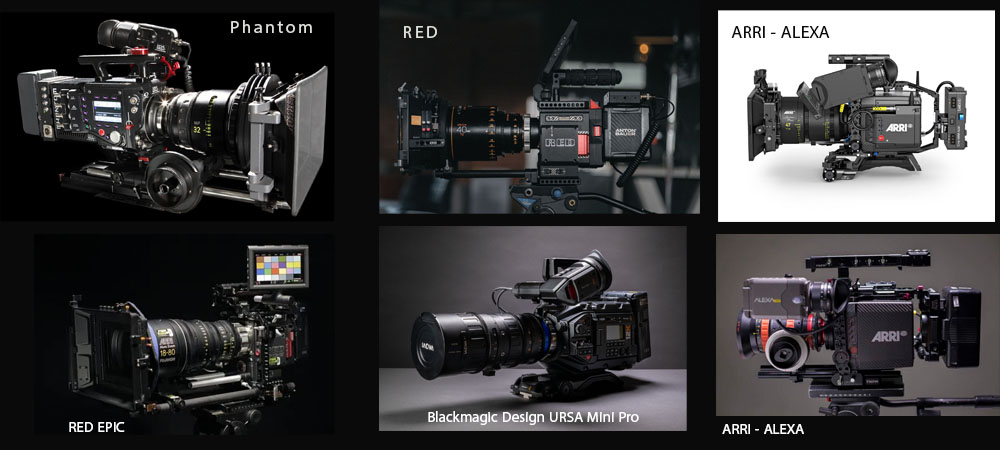
Cameras Supporting HDR/EXR Capture
RED Cinema Cameras: RED cameras, such as the REDSM2 HELIUM 8K S35 or RED RANGER, are widely used in the film industry and can capture images in HDR formats like EXR. These cameras typically record in RAW, and the footage can be converted to EXR or other HDR formats using image-processing software.
ARRI Alexa Series Cameras: The ARRI Alexa cameras, used extensively in professional filmmaking, support recording in high dynamic range formats. While these cameras do not natively store EXR, they can record in RAW or ProRes, which can later be converted to EXR during post-production.
Blackmagic Design URSA Mini Pro 12K: Blackmagic Design cameras are also widely used in the film industry and feature HDR capture capabilities. They typically record in RAW or CinemaDNG, and the captured footage can be converted to EXR in post-production.
Phantom Digital Cinema Cameras: Phantom cameras, used for high-speed filming and capturing precise detail, can generate HDR footage that can be saved as EXR or converted to it during post-production.
In most cases, images captured by these cameras are converted to EXR through post-production or compositing software such as Nuke, Autodesk Flame, or DaVinci Resolve. Therefore, while some cameras may not directly output EXR, HDR images can always be produced in this format.
It should be noted that EXR is primarily used for professional productions requiring high precision and wide dynamic range, and it is not a common storage format for general consumers or standard photography.
Applications of the EXR Format
The EXR (OpenEXR) format, due to its features such as high dynamic range (HDR), high color depth, and lossless compression support, is used across various areas in professional graphics and imaging. Key applications include:
Film and Visual Effects (VFX): EXR’s wide dynamic range and high color depth make it an excellent choice for storing images in films and visual effects productions. Artists can preserve detailed lighting and shadow information and work accurately in post-production compositing. Studios use EXR to store final renders, textures, and 3D simulations.
3D Animation: In 3D animation, where precise color, lighting, and shadow details are critical, EXR is an ideal format. It allows animators to store complex graphical data such as light, shadow, and textures without loss of quality, and it is fully compatible with software like Maya, Blender, and Houdini.
High Dynamic Range (HDR) Imaging: EXR is specifically designed to store HDR images requiring a wide dynamic range. It is particularly useful for HDR photography and computer graphics, where capturing the full spectrum of brightness and maintaining precise details in both bright and dark areas is essential.

Applications of EXR in Various Fields
Virtual Reality (VR) and Augmented Reality (AR): In VR and AR, high-precision and high-quality images are crucial for an immersive user experience. EXR, due to its high-fidelity image storage and wide dynamic range, is used to store 3D images and realistic environments in these fields.
Computer Graphics and Scientific Simulations: In scientific and technical simulations that require accurate visualization of data and results (such as light simulations, fluid dynamics, or gas simulations), EXR is used to store data as images with high color depth and precise details. Its support for multiple channels (e.g., depth, normals, material) makes it particularly useful in simulations requiring advanced and precise data storage.
Image Processing and Compositing: Compositing artists in the film and computer graphics industry use EXR to combine different images. This format allows various layers such as color, lighting, depth, and VFX passes—to be combined into a single file efficiently. Popular compositing software like Nuke and Fusion use EXR as a primary format for image processing.
Game Development and Content Creation: In the gaming industry, EXR can be used for storing textures, 3D environments, and HDR images. It is particularly suitable for AAA games and projects with complex graphics and precise lighting, serving as an ideal format for maintaining high-quality images.
Professional Photography and Digital Art: In professional photography and digital art, EXR is used for storing images with a wide dynamic range. This allows photographers and digital artists to preserve fine details in both bright and dark areas, providing greater control during editing and post-processing.
Summary: The EXR (OpenEXR) format has significantly improved image quality and detail in the film and animation industry. It is particularly useful in areas such as HDR imaging, visual effects (VFX), and post-production, enabling precise storage of light, color, and image detail at various production stages.
It is important to note that EXR is a file format and tool, not a technology in itself. It is used alongside other digital content production tools and technologies. Regarding ILM, the company that introduced EXR, this format is not considered one of ILM’s “revolutionary technologies”, but rather a practical and efficient tool for storing and processing images in complex cinematic and graphical projects.

Sadjad Jahangiri
![Verified]()